
Wan 2.7 vs Grok Imagine 1.5: Which AI Video Model Should You Use?
AI video generation is moving insanely fast.
Just a few months ago, most AI video tools were still struggling with basic motion, face consistency, and weird physics. Now we are already comparing models that can generate cinematic clips, preserve character identity, follow camera instructions, and even add native audio in the same workflow.
Two models getting a lot of attention right now are Wan 2.7 and Grok Imagine 1.5, especially Grok Imagine Video 1.5 Preview.
At first glance, they look similar.
Both can turn images into video.
Both can create short cinematic clips.
Both are designed for creators, marketers, AI filmmakers, and product teams.
Both support more advanced workflows than simple “type a prompt and get a random video.”
But after looking closer, they are not trying to win in exactly the same way.
Wan 2.7 feels like a director’s toolkit.
It is built for control, multi-reference workflows, character consistency, and more structured video creation.
Grok Imagine 1.5 feels like a fast creative engine.
It is especially strong for image-to-video, realistic motion, native audio, quick iteration, and short-form content production.
In this article, I’ll break down the real differences between Wan 2.7 and Grok Imagine 1.5, where each model wins, and which one you should choose for your own AI video workflow.
What Is Wan 2.7?
Wan 2.7 is the latest generation of Alibaba’s Wan AI video model family.
It is designed as a powerful multimodal video generation model that can work with text, images, video references, and audio references. Instead of only generating a short clip from a prompt, Wan 2.7 is closer to a full creative system for video generation, video editing, reference-based creation, and character-driven storytelling.
The biggest idea behind Wan 2.7 is control.
You can use it for:
- Text-to-video generation
- Image-to-video generation
- Reference-to-video workflows
- First and last frame control
- Multi-image reference input
- Character consistency
- Audio and motion synchronization
- Video editing through instructions
- Multi-shot storytelling
This makes Wan 2.7 especially interesting for creators who do not just want a beautiful random clip. They want to direct the scene.
For example, if you are creating a short branded video, product demo, AI influencer clip, or cinematic sequence, you may need more than one image reference. You may need the same character to appear across multiple shots. You may want to control the beginning and ending frame. You may also want audio, motion, and visual style to stay consistent.
That is where Wan 2.7 becomes useful.
It is not only a “video generator.” It is more like a structured AI video production model.
If you want to test this workflow without running into tight generation limits, you can try Wan 2.7 unlimited for image-to-video creation and fast creative iteration.
What Is Grok Imagine 1.5?
Grok Imagine 1.5 is xAI’s newer image and video generation family, with Grok Imagine Video 1.5 Preview being the most important version for video creators right now.
Its biggest strength is image-to-video generation with native audio.
The workflow is simple:
You upload a strong image as the visual anchor, describe the motion, camera movement, scene style, and sound, then Grok Imagine 1.5 generates a short video with synchronized audio.
Workflow note: Grok Imagine Video 1.5 Preview is best understood as an image/video-input video model, not a pure standalone text-to-video model. For text-only ideas, first generate or select a strong image, then animate it with Grok Imagine.
This is a huge deal.
Most AI video tools still require you to generate the video first, then create voiceover, sound effects, ambience, or music separately. Grok Imagine 1.5 reduces that friction by generating video and audio together.
That means you can create:
- Short social media videos
- AI movie trailer shots
- TikTok and Reels hooks
- Product concept clips
- Character animation drafts
- Cinematic image-to-video tests
- Fast creative prototypes
Grok Imagine 1.5 is also known for speed. In many workflows, it can generate clips quickly, making it useful for creators who want to test many ideas instead of spending too much time on one perfect shot.
The key phrase here is fast iteration.
If Wan 2.7 feels like a director’s control room, Grok Imagine 1.5 feels like a high-speed creative lab.
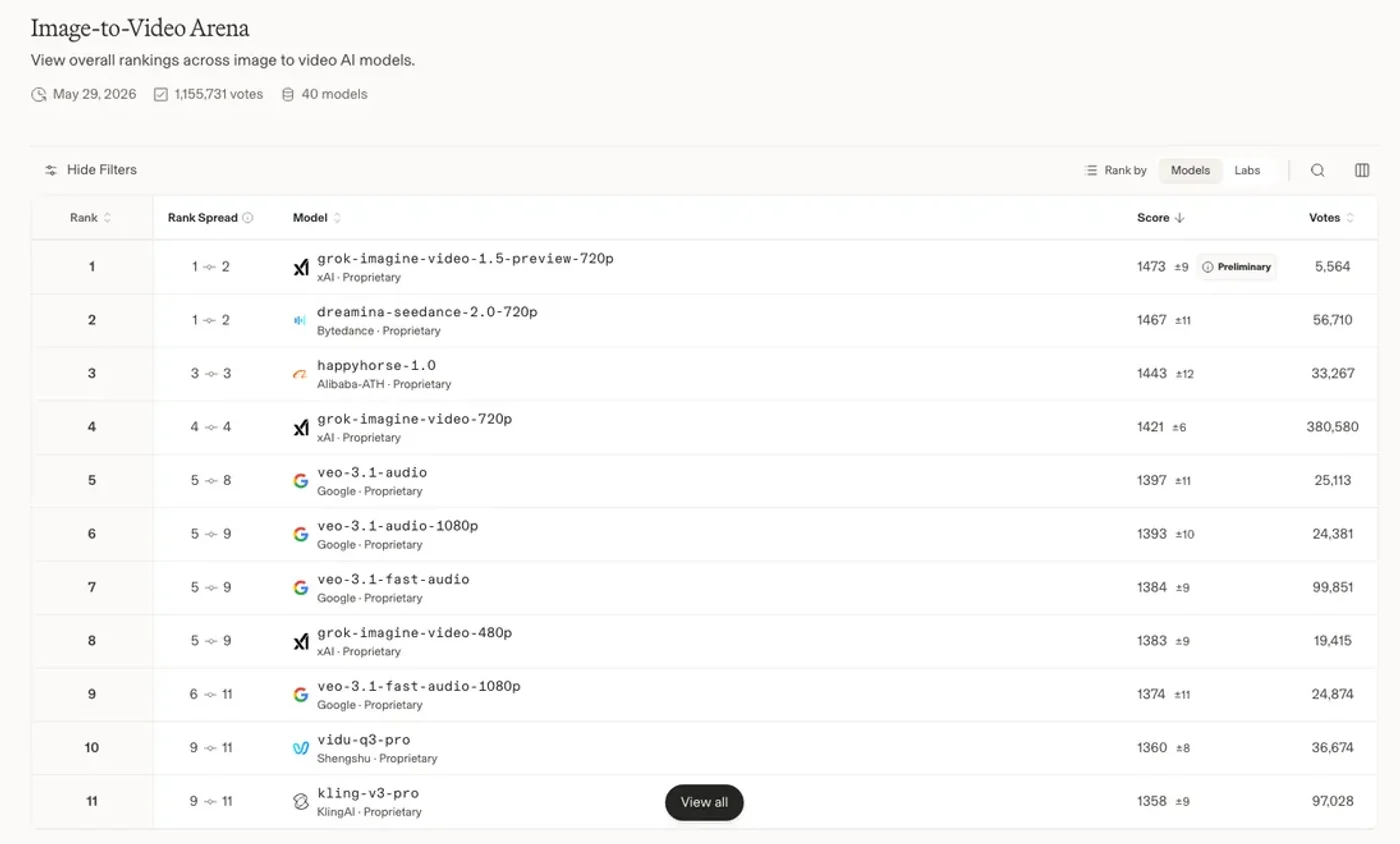
The public Image-to-Video Arena leaderboard also gives useful context. In the May 29, 2026 snapshot below, grok-imagine-video-1.5-preview-720p appears at the top of the image-to-video ranking, while Alibaba-related models such as happyhorse-1.0 also rank highly. This does not mean one model wins every workflow, but it does explain why Grok Imagine 1.5 is getting so much attention from image-to-video creators.
Wan 2.7 vs Grok Imagine 1.5: The Core Difference
The simplest way to understand the difference is this:
Wan 2.7 is better when you need structured control.
Grok Imagine 1.5 is better when you need fast, realistic, audio-ready image-to-video output.
Wan 2.7 gives you more tools to guide the final result. It is more flexible when your project needs references, characters, scene planning, and multi-shot control.
Grok Imagine 1.5 gives you speed, strong realism, and native audio in a very creator-friendly workflow. It is especially strong when you already have a good image and want to bring it to life quickly.
Here’s what you need to know.
1. Image-to-Video Quality
Image-to-video is one of the most important AI video workflows right now.
Why?
Because text-to-video is still unpredictable. If you only write a prompt, the model has to invent everything: character, composition, lighting, style, camera angle, clothing, background, and motion. That creates more room for mistakes.
Image-to-video gives the model a visual anchor.
You first create or upload a strong image. Then the model only needs to animate it.
This is where Grok Imagine 1.5 is especially strong.
Grok Imagine Video 1.5 Preview has been praised for preserving the subject, maintaining the visual style, and creating natural camera movement from a still image. It works well when the input image is clean, clear, and visually strong.
For example, if you upload a cinematic portrait and ask for subtle head movement, wind in the hair, a slow camera push-in, and soft background ambience, Grok Imagine 1.5 can produce a very compelling short clip.
Wan 2.7 is also strong at image-to-video, but its advantage is less about one-click realism and more about controllability. If you want to define start and end frames, combine multiple references, or build a more structured scene, Wan 2.7 may give you more creative control.
So the practical takeaway is simple:
Use Grok Imagine 1.5 when you want to quickly animate one strong image.
Use Wan 2.7 when your image-to-video workflow needs more control, references, or planned structure.
For product clips, character shots, and branded assets, a Wan 2.7 AI video workflow is usually more useful when you need repeatable output instead of a one-off experiment.
2. Audio Generation and Sync
Audio is becoming one of the biggest battlegrounds in AI video.
A silent AI video may look impressive, but it often still feels unfinished. For real social media, ads, trailers, product videos, and storytelling, audio matters.
Grok Imagine 1.5 puts native audio at the center of the workflow.
It can generate video with:
- Dialogue
- Natural voice rhythm
- Environmental sounds
- Sound effects
- Background music
- Spatial audio-like movement
This makes it very attractive for creators who want ready-to-share short clips.
You do not need to generate a video, export it, find a voice tool, generate audio, sync it, add sound effects, and edit everything again. Grok Imagine 1.5 can produce a more complete first draft in one pass.
Wan 2.7 also supports audio-related workflows, including voice references and audio-motion synchronization. Its advantage is that it can be part of a more controlled production pipeline, especially when you are working with characters, voices, references, and multi-scene planning.
The difference is about workflow style.
Grok Imagine 1.5 is better for fast native audio output.
Wan 2.7 is better for more structured audio-video control.
If you are making quick social clips, Grok Imagine 1.5 is probably easier.
If you are building a more complex AI video workflow, Wan 2.7 may be more flexible.
If you want output today, start here: Launch Wan 2.7 Now →
3. Control and Creative Direction
This is where Wan 2.7 starts to shine.
Wan 2.7 is built for creators who want more control over the video generation process. Features like first and last frame control, multi-image reference, subject reference, voice reference, and instruction-based editing make it useful for more advanced projects.
For example, imagine you are creating a 15-second product ad.
You may want:
- The first frame to show the product on a clean background
- The middle section to show a hand using the product
- The ending frame to show the product with a call-to-action style composition
- The same product color and shape across the full clip
- A specific camera movement
- A consistent commercial lighting style
Wan 2.7 is better suited for this kind of directed workflow.
Grok Imagine 1.5 can also follow camera instructions and motion prompts, but it feels more optimized for fast generation from a strong visual anchor. It is excellent when the prompt is clear and the scene is not overly complex.
So if your priority is speed and beautiful motion, Grok Imagine 1.5 is very strong.
But if your priority is control, planning, references, and repeatability, Wan 2.7 has the edge.
4. Video Length and Extension
Both models are mainly focused on short video generation.
Grok Imagine 1.5 usually works in the 6–15 second range. This is enough for many social media clips, AI trailer shots, product teasers, and short hooks. It also supports video extension, which means you can continue from the last frame and build a longer sequence.
That extension feature is important because AI video is not just about one clip. Many creators want to generate multiple clips and stitch them together into a longer story.
Wan 2.7 also supports short cinematic video generation, often up to around 15 seconds depending on platform implementation. Its strength is that it can support multi-shot and reference-based workflows, which can help when you want to build a more connected video sequence.
In real use, you should not think of either model as a full movie generator.
Think of them as powerful clip generators.
The best workflow is usually:
- Generate several short clips
- Select the best ones
- Extend or regenerate weak parts
- Edit them together
- Add final captions, music, and branding
Grok Imagine 1.5 is great for quickly producing many candidate clips.
Wan 2.7 is better when each clip needs more planned direction.
5. Realism, Motion, and Physics
Grok Imagine 1.5 has a strong reputation for realism.
Its image-to-video results can look cinematic, natural, and physically believable, especially when the scene is based on a high-quality input image. Camera movements such as push-ins, pans, tracking shots, and subtle handheld motion can look clean and polished.
It also performs well with facial motion, eye movement, glass, lighting, and small atmospheric details when the prompt is not overloaded.
Wan 2.7 is also capable of high-quality cinematic output, but its biggest value is not only realism. It is realism plus control.
In other words:
Grok Imagine 1.5 may win when you want the fastest beautiful result.
Wan 2.7 may win when you need to guide the result more carefully.
For creators, this matters a lot.
If you are making a viral AI video, speed matters. You may want to test 20 variations and pick the best one. Grok Imagine 1.5 fits that workflow.
If you are making a product video, ad creative, or branded content, consistency matters. You may care more about repeatability and reference control. Wan 2.7 fits that workflow better.
For a closer look at how it stacks up against other models, see Gemini Omni vs Wan 2.7.
If you want to test it without installing anything, the free Wan video generator works in the browser.
If you want to test it without installing anything, the free image-to-video generator works in the browser.
6. Best Use Cases for Wan 2.7
Wan 2.7 is a strong choice if you need a more controlled AI video workflow.
It is especially useful for:
Product Videos
If you are creating videos for e-commerce, product ads, or landing pages, you often need consistency. The product cannot randomly change shape, color, or material.
Wan 2.7’s reference-based control makes it useful for product-driven video generation.
AI Influencer Content
AI influencer videos require character consistency. The same face, style, outfit, and personality need to appear across different scenes.
Wan 2.7 is better suited for workflows where you need to maintain identity across multiple generations.
Storytelling and Multi-Shot Scenes
If your video has more than one shot, Wan 2.7 is attractive because it supports more structured direction.
You can think in scenes, references, and planned camera movement.
Commercial Creative Testing
For marketers, Wan 2.7 can be useful for testing different ad concepts before spending money on production.
You can create multiple visual directions, compare them, and then decide which concept deserves more investment.
7. Best Use Cases for Grok Imagine 1.5
Grok Imagine 1.5 is a strong choice if speed, realism, and audio matter most.
It is especially useful for:
TikTok, Reels, and Shorts
Short-form content rewards speed. You need to test hooks quickly. Grok Imagine 1.5 is great for turning a strong image into a moving clip with audio.
Cinematic Drafting
If you are testing a movie trailer idea, a fantasy scene, a character shot, or a dramatic visual concept, Grok Imagine 1.5 can help you get a polished draft quickly.
Social Media Experiments
For creators who post frequently, fast generation is a big advantage. You can create more variations, test more ideas, and move faster.
Image-to-Video Workflows
If your workflow starts with image generation, Grok Imagine 1.5 is very powerful. You can first create a strong image, then animate it with natural motion and sound.
Ready to try it yourself? Try Wan 2.7 Free →
Wan 2.7 vs Grok Imagine 1.5: Quick Comparison
| Category | Wan 2.7 | Grok Imagine 1.5 |
|---|---|---|
| Best For | Controlled video creation | Fast image-to-video generation |
| Main Strength | References, consistency, direction | Realism, speed, native audio |
| Image-to-Video | Strong and controllable | Extremely strong and fast |
| Text-to-Video | Useful for structured scenes | Not the main documented workflow; best used from image/video input |
| Audio | Supports audio sync and references | Native audio generation is a major strength |
| Character Consistency | Strong for reference workflows | Good, especially from a strong image |
| Creative Control | Better for advanced workflows | Better for simple fast iteration |
| Social Media Clips | Good | Excellent |
| Product Ads | Very strong | Good for fast concepts |
| Storytelling | Stronger for planned scenes | Stronger for quick cinematic drafts |
Which One Should You Choose?
Here is the simple answer.
Choose Wan 2.7 if you care about control.
It is better when you want to plan scenes, use references, maintain character or product consistency, and create more structured videos. It is a better fit for commercial workflows, AI influencer content, product ads, and multi-shot storytelling.
Choose Grok Imagine 1.5 if you care about speed and native audio.
It is better when you want to quickly animate images, create social content, test cinematic ideas, and generate short clips with sound. It is especially useful for creators who want to move fast and publish often.
But the smartest workflow may not be choosing only one.
You can use both.
For example:
- Use an image model to create a strong visual concept
- Use Grok Imagine 1.5 to quickly test motion and audio
- Use Wan 2.7 when you need more controlled versions
- Edit the best clips into a final short video
- Add captions, branding, and CTA for publishing
That is how many AI creators will work going forward.
The future of AI video is not one model replacing every other model. The future is model stacking.
You use the best model for each step.
My Practical Recommendation
If you are a casual creator, start with Grok Imagine 1.5.
It is fast, exciting, and very good for turning ideas into short videos. The native audio makes the result feel more complete, and the image-to-video quality is one of its biggest advantages.
If you are a marketer, product creator, or AI video power user, spend more time with Wan 2.7.
The control features matter more when your video is not just for fun. If you are making product demos, ads, branded content, or repeatable character videos, Wan 2.7 gives you more room to build a serious workflow.
If you are building an AI video tool or content pipeline, you should test both.
Grok Imagine 1.5 can be your fast ideation engine.
Wan 2.7 can be your controlled production engine.
That combination is very powerful.
The Bottom Line
Wan 2.7 and Grok Imagine 1.5 are both impressive AI video models, but they are built for slightly different creators.
Wan 2.7 is for control.
It is better for structured scenes, multi-reference workflows, product consistency, character control, and more serious creative direction.
Grok Imagine 1.5 is for speed.
It is better for fast image-to-video generation, realistic short clips, native audio, social media content, and rapid creative testing.
If you want to create one beautiful short video quickly, Grok Imagine 1.5 may feel more exciting.
If you want to build a repeatable AI video workflow with more control, Wan 2.7 may be the better long-term tool.
The real winner depends on your use case.
For creators, the best question is not “Which model is better?”
The better question is:
What kind of video am I trying to create, and how much control do I need?
Once you answer that, the choice becomes much clearer.
If control is the priority, start with a Wan 2.7 AI video generator, create a few image-to-video tests, then compare the best results against Grok Imagine 1.5 for speed and audio.
Related guides
- Gemini Omni vs Wan 2.7: Which AI Video Model Should Creators Use?
- Wan 2.6 vs Wan 2.7: Key Differences, New Features & Which AI Video Model to Choose in 2026
- Wan 2.7 vs HappyHorse 1.0: Which AI Video Generator Is Better in 2026?
References
- xAI Grok Imagine Video 1.5 Preview model documentation: Model details, API model name, alias, supported output formats, and pricing information.
- xAI Grok Imagine video generation API guide: Video generation endpoint and implementation details for developers.
- xAI Imagine model family documentation: Grok Imagine image generation model information and related model family context.
- Arena AI Image-to-Video leaderboard: Leaderboard snapshot used for the ranking context in this article.
- Reuters report on Alibaba's Wan video model: Background on Alibaba's public positioning of Wan and its earlier open-source release strategy.
- Wan technical paper: Open and Advanced Large-Scale Video Generative Models: Model family, architecture direction, video generation tasks, open-source strategy, and benchmark performance.
- Wan-S2V technical paper: Audio-Driven Cinematic Video Generation: Audio-driven cinematic video generation research built on the Wan model family.
- Wan-Move technical paper: Motion-controllable Video Generation via Latent Trajectory Guidance: Motion controllability research based on Wan image-to-video models.
- K-Sort Arena paper on human preference evaluation: Benchmark methodology background for arena-style evaluation of generative models.
Free Tools
- Free Wan2.1 Video Generator
Generate videos with Wan2.1 model
- Free Wan2.2 Video Generator
More powerful Wan2.2 model
- Speech to Video Generator
Convert speech to video
- Text to Video Generator
Transform text into videos
- Image to Video Generator
Animate your images
- Z Image Generator
AI-powered image generation
- Wan Animate AI
AI-powered animation tool
Latest Posts
How to Make Money with Free AI Video Tools for E-Commerce
a day agoHow to Make Real Estate Listing Videos from Photos
a day agoHow to Make TikTok Product Videos with AI for Free
a day agoHow to Remove Background from Product Videos Without a Green Screen
a day agoPixVerse C1 vs Wan 2.7: Complete Comparison Guide (2026)
a day ago
Recommended Reading
Read More
Wan 2.7 vs Veo 3.1: Complete Comparison Guide for AI Video Creators in 2026
Wan 2.7 vs Veo 3.1 comparison — tested side-by-side on video quality, character consistency, speed, and pricing. See real test results and find the best AI video model for your workflow.

What Is Wan 2.7? Alibaba's Latest AI Video Model Explained
Curious about Wan 2.7? We break down Alibaba's latest AI video model — how it compares to Seedance 2.0, Wan 2.1, and Kling 3, and what you can create with it.

Wan AI Video Generator: Complete Guide to Creating Videos from Text & Images (Free)
Wondering how to use the Wan AI video generator? I tested Wan 2.1-2.7 for text-to-video and image-to-video - with free options, prompts, and real results.

Gemini Omni vs Wan 2.7: Which AI Video Model Should Creators Use?
Compare Gemini Omni vs Wan 2.7 for AI video generation. Learn their differences, strengths, creative workflows, image-to-video use cases, and which model is better for creators, marketers, and developers.